

MPEG-DASH (MPD) and HLS (M3U8) Downloader for Streaming Video
Why You Can’t Download MPEG-DASH Video
If your downloader shows separate video and audio streams or fails completely, it’s because MPEG-DASH splits media into multiple tracks.
Advanced MPEG-DASH (MPD) Stream Support
MPEG-DASH (Dynamic Adaptive Streaming over HTTP) is a modern streaming technology that delivers media as separate video and audio segments, described in a manifest file (MPD).
Unlike simple downloads or even HLS streams, DASH typically separates:
- Video track (multiple resolutions and bitrates)
- Audio track (multiple languages or qualities)
- Subtitles (optional tracks)
These components must be detected, downloaded, synchronized, and merged correctly.
How MPEG-DASH Downloading Works
Downloading DASH content involves multiple steps:
- 1. MPD Manifest Detection
The downloader identifies and parses the MPD file that describes available streams. - 2. Stream Selection
The software selects the appropriate video and audio tracks based on quality and format. - 3. Segment Downloading
Media segments are downloaded sequentially or in parallel. - 4. Track Synchronization
Audio and video streams are aligned in time. - 5. Merging into a Single File
All components are combined into a final playable video.
Ant Download Manager automates this entire process, making complex DASH streams easy to download.
Advanced DASH Features Supported
A modern MPEG-DASH downloader should handle:
- MPD manifest parsing
- Separate audio and video streams
- Automatic stream merging
- Adaptive bitrate selection
- Multi-track content (audio, subtitles)
Ant Download Manager supports all these features, ensuring compatibility with modern streaming platforms.
Why MPEG-DASH Support Matters
MPEG-DASH is widely used for:
- High-resolution video (HD, 4K)
- Adaptive streaming
- Multi-language audio tracks
- Professional media delivery
Without DASH support, many modern video streams cannot be downloaded correctly.
HLS vs MPEG-DASH – Key Differences
| Feature | HLS(M3U8) | MPEG-DASH (MPD |
|---|---|---|
| Streaming type | Segmented streaming | Segmented streaming |
| Playlist format | Often combined | Usually separate tracks |
| Audio & video | No | Limited |
| Adaptive bitrate | Yes | Yes |
| Multi-track | Limited | Advanced (audio, subtitles) |
| Complexity | Lower | Higher |
| Segment structure | Simple sequence | Flexible and dynamic |
| Merging required | Almost alway | Almost alway |
| Common use | General streaming | High-quality & adaptive streaming |
Note: AntDM does not support DRM protection.
How MPEG-DASH (MPD) Streaming Works in Detail
MPEG-DASH (Dynamic Adaptive Streaming over HTTP) delivers media as separate segments described in an MPD (Media Presentation Description) file. Unlike traditional downloads, DASH streams are structured and adaptive, allowing flexible delivery of video, audio, and subtitles.
A typical DASH stream includes:
- MPD manifest (XML) – describes available streams and structure
- Representations – different quality levels (bitrate, resolution, codecs)
- Adaptation sets – group related tracks (video, audio, subtitles)
- Segments (.m4s or .mp4) – small chunks of media data
During playback, the player parses the MPD, selects appropriate streams, and downloads segments dynamically.
MPD Structure Explained
The MPD file is the core of DASH streaming. It defines:
- Available video and audio streams
- Segment duration and timing
- Codec and resolution information
- URLs or templates for segment access
Typical MPD hierarchy:
- Period – timeline section
- AdaptationSet – type of media (video/audio/subtitles)
- Representation – specific quality level
- SegmentTemplate / SegmentList – how to locate segments
A DASH downloader must correctly interpret this structure to reconstruct the full media file.
Separate Audio and Video Streams
Unlike simpler streaming formats, MPEG-DASH usually separates:
- Video stream
- Audio stream
- Subtitles
This means:
- Multiple files must be downloaded
- Tracks must be synchronized
- Final output must be merged
Ant Download Manager automatically downloads and combines these streams into a single playable file.
Segment Addressing and Templates
DASH often uses dynamic URL patterns instead of fixed segment lists.
Common methods:
- SegmentTemplate (URL pattern with variables)
- SegmentTimeline (timing-based segment generation)
- SegmentBase (single file with indexing)
Example concepts:
- $Number$ → segment index
- $Time$ → timestamp-based segments
A downloader must generate correct segment URLs based on these templates.
Adaptive Bitrate and Stream Selection
MPEG-DASH supports advanced adaptive streaming:
- Multiple bitrates and resolutions
- Dynamic switching during playback
- Different codecs per representation
For downloading, this introduces complexity:
- Selecting a consistent quality level
- Avoiding mixed streams
- Matching audio and video correctly
AntDM automatically selects compatible streams and ensures stable output.
Encryption and Common Encryption (CENC)
Many DASH streams use standardized encryption methods.
Common mechanisms include:
- AES-based encryption
- Common Encryption (CENC)
- Initialization Vector (IV)
- Key rotation
In DASH:
- Encryption info is defined in the MPD
- Media segments are encrypted individually
- Keys are referenced via standard signaling
A compatible downloader must process these parameters to correctly assemble the media stream.
These encryption methods are part of standard streaming delivery and ensure secure and stable media distribution.
Challenges in MPEG-DASH Downloading
Compared to HLS, DASH is more complex due to:
- Multi-track structure (audio/video/subtitles)
- Dynamic segment generation
- Complex MPD manifests
- Stream synchronization requirements
- Encrypted media segments
This is why many basic download tools cannot handle DASH streams properly.
Why MPEG-DASH Support Matters
MPEG-DASH is widely used for:
- High-resolution video (HD, 4K, adaptive streaming)
- Multi-language audio tracks
- Modern web-based media delivery
- Professional streaming infrastructure
Why AntDM Works Where Others Fail
Most tools try to extract a single video file from the page. This approach breaks with MPEG-DASH streams.
AntDM captures the stream directly from network traffic, allowing it to handle complex video delivery systems.
Without DASH support, a downloader cannot reliably process many modern video streams.
How Ant Download Manager Works: Engineered for Seamless Capturing
Ant Download Manager (AntDM) is a robust Windows desktop application specifically engineered to handle complex web streams that cause standard browser downloaders or online web-converters to fail.
To bypass browser security limitations and guarantee reliable downloads, our software architecture is split into three powerful, synchronized components:
[Browser Extension]  <--->  [Native Messaging Host]  <--->  [AntDM Core Application]
(Monitors & Detects)        (Secure Native Bridge)          (Multi-threaded Stitching)
- The Browser Extension: This lightweight component constantly monitors your browser's network traffic in the background to immediately detect hidden media streams and manifest files.
- The Native Messaging Host: Acting as a secure, high-speed native bridge, it instantly transfers the intercepted streaming links from the browser extension directly to the main desktop application.
- The AntDM Core Application: A fully independent, standalone Windows software that performs heavy-duty multi-threaded downloading of all video fragments and executes the final high-fidelity merging of video and audio tracks.
Step-by-Step Guide: How to Download Web Streams with AntDM
Step 1: Download and Integrate
- Download the official AntDM installer directly from our website https://antdownloadmanager.com/.
- Install the application on your Windows PC.
- Integrate the extension into your preferred web browser (Chrome, Edge, Firefox or their clones) during the setup process.
Once properly configured, the active AntDM extension icon will appear in the top-right corner of your browser toolbar, confirming it is ready to monitor media.
Step 2: Detect the Video Stream
Navigate to the web page containing the video you want to save and click Play. If the video is publicly accessible (and not restricted by digital rights management (DRM) or custom proprietary encryption algorithms), AntDM will instantly capture the stream configuration.
Step 3: Choose Your Download Interface (Video Button vs. Video Box)
AntDM provides two convenient, highly customizable layout modes to capture your media depending on your personal preference.
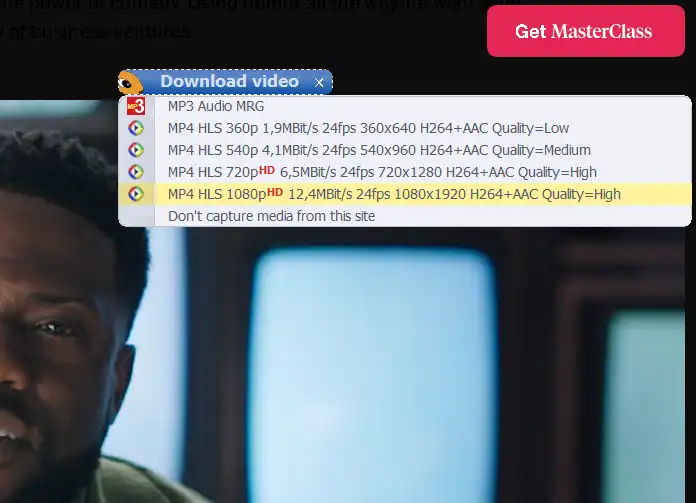
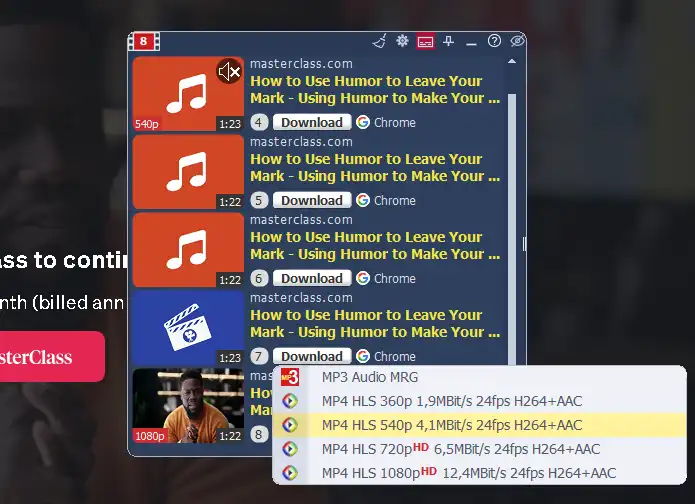
Option A: The Video Button (Default Mode)
A discrete download button will appear directly over the video player (usually in the upper-right corner).
- Click this button to open a drop-down menu displaying all available resolutions and formats detected.
- Select your preferred quality to immediately send the stream to the AntDM download queue.
Option B: The Video Box (Advanced Mode)
If you prefer a comprehensive view of all available media assets on a single web page, you can switch from the Video Button to the Video Box:
- Click the AntDM extension icon in your upper-right browser toolbar.
- Click the Right Arrow (->) button to expand the extension menu.
- Locate the interface settings and switch the radio button preference to Video Box.
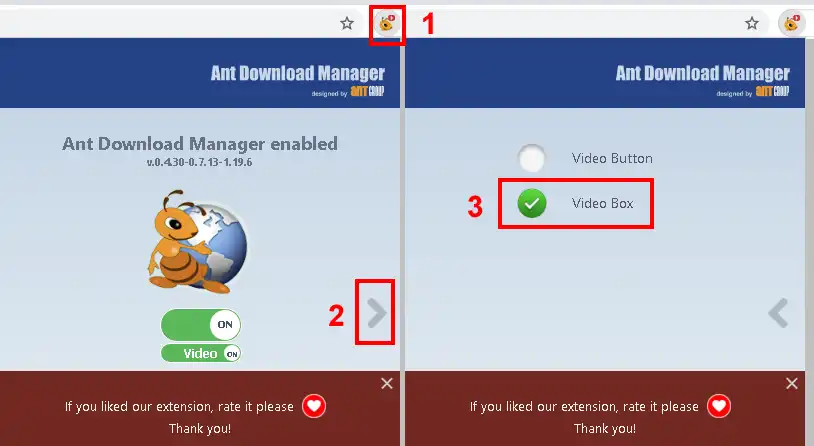
Once enabled, the Video Box will list all captured video and audio components in a clean interface, allowing for advanced bulk selection and detailed media link management.
