Best Download Manager for Windows – Top Download Managers Compared | AntDM

Best Download Manager for Windows – Top Download Managers Compared

Choosing the best download manager for Windows can be tough — with so many options available, it’s important to pick a solution that combines speed, reliability, ease of use, and advanced features. On this page, we compare the best download managers on the market and explain why Ant Download Manager (AntDM) is a powerful, modern choice for users of all levels.

What Makes a Great Download Manager?

A top download manager should offer fast downloads, support for multiple file types, smooth integration with popular browsers, and flexible control over download tasks. Key features to look for include multi-threaded acceleration, pause/resume capabilities, reliable file integrity, support for both standard file downloads and media downloads from websites, and even torrent file management.

  • Speed: Multi-threaded technology for faster downloads.
  • Stability: Resume downloads after interruptions.
  • Browser Integration: Works with Chrome, Firefox, Edge, and more.
  • Media Support: Ability to download videos, audio, and torrents.
  • Ease of Use: Intuitive interface with clear controls.

Top Download Managers – Feature Overview

Below is a comparison of popular download managers for Windows, including AntDM and other leading applications:

Download Manager Multi‑threaded Speed Video Download Support Browser Integration Torrent Support Free / Paid
Ant Download Manager ✔ Yes ✔ Extensive ✔ Chrome, Firefox, Edge, Opera ✔ Yes Free & Paid (Trial)
Internet Download Manager (IDM) ✔ Yes ✔ Basic ✔ Chrome, Firefox, Edge ✖ No Paid (Trial)
Free Download Manager (FDM) ✔ Yes Limited ✔ Chrome, Firefox ✔ Yes Free
JDownloader ✔ Yes Limited ✔ Various ✖ No Free
EagleGet ✔ Yes Limited ✔ Chrome, Firefox ✖ No Free

Why Ant Download Manager Is a Top Choice

Ant Download Manager stands out for its strong balance of performance, features, and value. Its multi-threaded acceleration ensures fast downloads, while powerful video and torrent downloading tools allow you to save media from popular platforms like YouTube, Vimeo, Dailymotion, and many others. The intuitive interface makes it easy for beginners, and advanced controls satisfy power users.

Reliable and Fast

AntDM uses efficient download algorithms to speed up even large files, while maintaining stability and integrity. You can pause and resume downloads, prioritize tasks, manage queues, and handle torrent files seamlessly — all essential for users managing multiple downloads.

Video, Audio, and Torrent Support

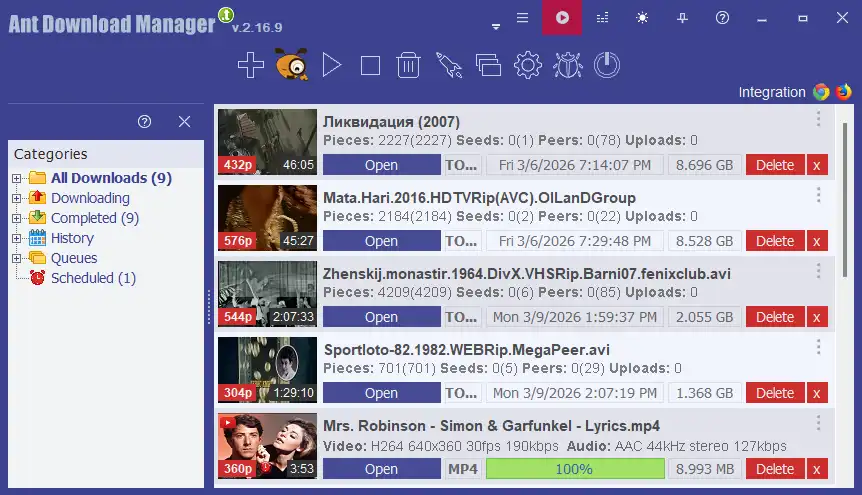
Unlike many traditional download managers, AntDM includes a full Download Manager and torrent manager. You can choose video quality, extract audio tracks, and download torrent files directly into your system. This makes AntDM a comprehensive solution for all types of downloads.

Seamless Browser Integration

AntDM integrates seamlessly with major browsers like Chrome, Firefox, Edge, and Opera. With built-in extension support, AntDM detects downloadable content and provides a simple “Download” button right in your browser window — no need to manually copy URLs.

Flexible Licensing

Ant Download Manager offers both a free version and a paid version with advanced features. This makes it accessible for basic users while providing extended capabilities for users who need more control and performance.

Conclusion – Best Download Manager for Windows

Choosing the right download manager can make a big difference in how efficiently you handle files, media, and torrents online. Ant Download Manager delivers speed, stability, extensive platform support, video and torrent download features — all wrapped in a user-friendly experience. Whether you’re a casual downloader or a power user, AntDM stands out as one of the best download managers for Windows.

Ready to experience powerful downloads? Download Ant Download Manager today and take control of your downloads with confidence.

Learn More

Ant Download Manager screenshot