
Scheduler
You can schedule the download of the file (s) once, periodically, cyclically, with a stop in time, with repeated downloads upon receipt of an error and shutdown of the computer after downloading.
Also you can schedule a download directly from Download Link with AntDM window in Additional options or in Context Menu in the download list.
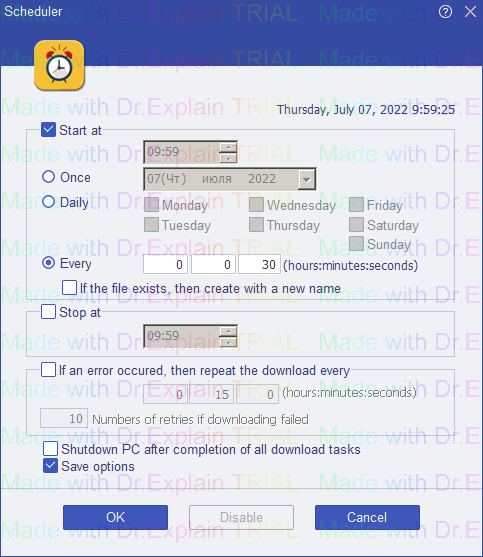
Start in -
-
Once - the download starts once at a specified time.
-
Daily - the download starts at specified days and time.
-
Every - the download starts periodically at a time interval after the end of the previous file downloads.
If the file exists, then create with a new name - in some cases you want to download many different files with a single link in a single task. These files will be numbered. For example, it could be a streaming live video of each frame changing over a short period of time.
Stop in - stop the download at a specified time.
If an error occured, then repeat the download every - when a file download error is received, the download is repeated periodically at a specified number of times.
Shutdown PC after completion of all download tasks - automatically shutsdown PC via 30 seconds after completion of all the downloads.
The help manual was created with Dr.Explain
Unregistered version