
Torrents
To be able to download torrents, you must enable BitTorrent peer-to-peer protocol support when you are installing the software.
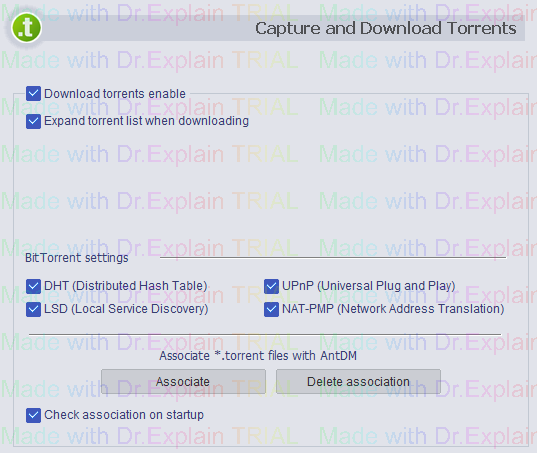
Download torrents enable - enables\disables BitTorrent protocol support.
Expand torrent list when downloading - when AntDM starts download it expands the torrent list and shows the progress for each torrent file. If there are too many files (hundreds) in the torrent list, this may slow down AntDM a bit. You can disable this feature to expant the torrent's download list AntDM itself.
BitTorrent settings - specific settings for the BitTorrent peer-to-peer protocol.
Associate *.torrent files with AntDM - if you associate torrent files with AntDM software, Windows associates all torrent files with AntDM, assigns AntDM icon to torrent files, runs AntDM by default to download torrent files, etc.
Check association on startup - some other softwares may also associate themselves with torrent files. They replace AntDM association with their own. After that Windows will not associate torrent files with AntDM and will not run AntDM by default to download torrent files. AntDM can check the current association at its start and suggest restoring it.
The help manual was created with Dr.Explain
Unregistered version