
Browser Integration
Enable Browser Integration - quick disabling (not deleting!) integration in all browsers at once. How to remove integration see here.

Suppress blank tab after the capture file to download - sometimes the browser initiates a file download in a new tab. After capturing the file for download, the browser extension tries to find such a tab and close it.
Forbid return of download to the browser - if checkbox is not checked, then if the user refused to download the file (pressing the "Cancel" button) or if the user did not decide to download the file within 25-30 seconds, the download will be returned to Chrome browser. Chrome browser will continue to download the file.
The picture shows how AntDM extension stopped downloading in the browser and switched its to Paused state.
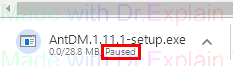
Proactive download link capture - a browser extension can capture a download link in-flight, roughly and quickly when the browser detects it, or softly in response to the captureed download link from the browser. In the first case, some errors are inevitable, because only the browser knows for sure that the file is intended for download and is not a display element on the site. In the second case, the link comes with some delay, but with full confidence that the file should be downloaded.
This mode affects the work of extensions for all chrome clones with the exception of the Vivaldi browser. The Firefox clone addon and the Vivaldi browser extension already work in this mode, regardless of whether the checkbox is checked or not.
The following key(s) to prevent downloading for any links - you can use keyboard shortcuts to automatically not open the window Download Link with AntDM if you click on the browser link. By holding down the key, clicking on the link you will no longer see the AntDM window.
Add clones... - If you are using the Chrome clone (Opera, Vivaldi, Comodo Dragon, etc.), then its executable EXE module must be registered in Add Chrome clones list. If you have a file grab in the browser, works an extension context menu, but video capture does not work, then check this list. Perhaps you should add the EXE file of your browser there. Too many clones, we do not always have time to update this list.
The help manual was created with Dr.Explain
Unregistered version